 Marcus FeldEditor-in-Chief
Germany Jersey: Catalog & Google Sheets Audit
Define the audit goal first When organizing Germany jersey candidates, the real task is not checking whether the page "looks like the German team," but whether each record leads back to the correct product page, and whether you track team version, colorway or number, size, and evidence status separately. Currently, the verifiable catalog item is a Germany retro-style kids' soccer jersey. The page lists a reference price of $11.75, while the final ite
Editor score 4.2 / 5
Define the audit goal first
When organizing Germany jersey candidates, the real task is not checking whether the page "looks like the German team," but whether each record leads back to the correct product page, and whether you track team version, colorway or number, size, and evidence status separately.
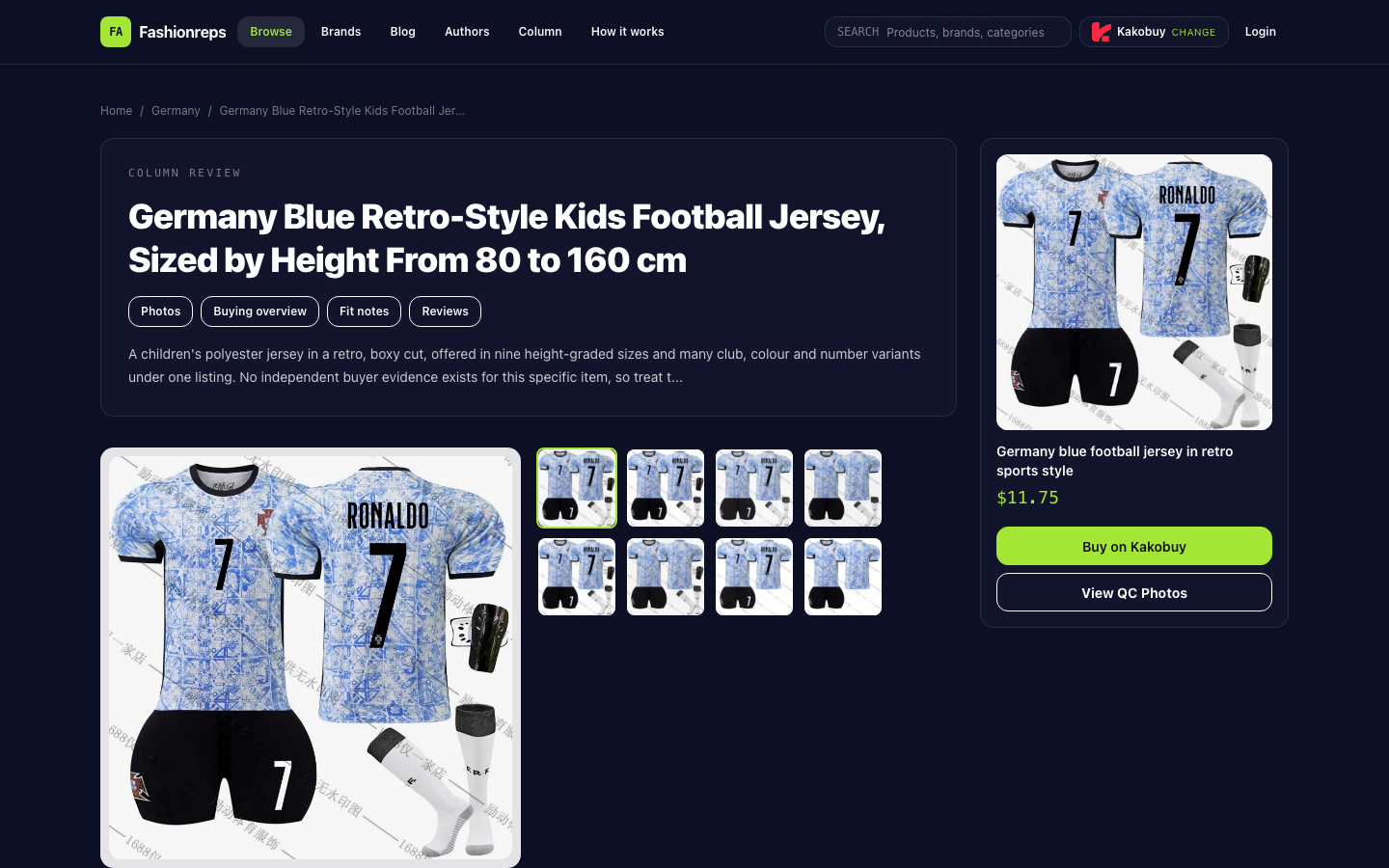
Currently, the verifiable catalog item is a Germany retro-style kids' soccer jersey. The page lists a reference price of $11.75, while the final item price, service fees, and international shipping need to be confirmed on the shopping agent site. The product description states the outer layer is polyester and the inner layer contains spandex, a synthetic blend; sizes range by height from 80–90 cm to 155–160 cm across nine tiers. The page does not provide fabric weight, knit type, dye, or finishing details, nor independent buyer evidence for this specific item.

Catalog first handles discovery and product revisits
This kind of catalog is good for three actions: finding candidates, opening product details, and returning to the original link for rechecking.
On the product page, first see if the title clearly points to Germany, then check product images, Buying overview, Fit notes, and Reviews sections. The page also offers Buy on Kakobuy, switching shopping agents, and View QC Photos entries. These entries only mean the page provides browsing paths; they do not imply inventory, shipping time, or QC results are guaranteed.
Copy these fields from the page item by item rather than guessing from pictures:
- Product title and original page URL
- Team or country indicator
- Main color and other visible colorways
- Number or style info explicitly stated on the page
- Height size range
- Whether product images display properly
- Whether a QC photo entry exists
- Reference price shown on the page
- Last page review time
The current source mentions this item has multiple club, color, and number variants, but the provided product page evidence is insufficient to confirm every variant is currently selectable. Therefore, when recording, separate "page claims variants" and "currently verified specific options" into two columns; do not write the former directly as a purchasable list.
Google Sheets organizes evidence and filtering status
As the number of candidates grows, the value of the sheet is not to replace the product page, but to keep each record trackable. Use this minimal set of fields:
| Field | How to record |
|---|---|
| Candidate name | Keep original page text or a short normalized name |
| Team version | e.g., Germany; mark as to verify if uncertain |
| Colorway or number | Fill only what the page explicitly shows or the seller confirms |
| Size basis | Height range, flat chest width, length, or pending |
| Product image | Normal, missing, or need to reopen page |
| QC entry | Has entry, no entry, or not checked |
| Original link | Paste product detail page URL, avoid saving only agent redirects |
| Reference price | Record only the page's reference value, and note the date |
| Evidence status | Verified, awaiting seller confirmation, unable to confirm |
| Next step | Ask for flat measurements, confirm number, recheck link, etc. |
When filtering, first filter out records with "team version uncertain," "number unconfirmed," and "link not rechecked," then decide which candidates are worth further inquiry. Do not judge purchase suitability by price alone, because service fees, international shipping, and final item price are not yet determined on the catalog page.
How to avoid mismatching numbers, colorways, and links
The most error-prone step is combining multiple pieces of information from the same page into an unverified combination. For example, the page may mention multiple colors and numbers, but the current screenshot or product image does not simultaneously show a specific number with a specific colorway. In that case, handle in this order:
- Copy the title and original link from the product page to create a unique candidate record.
- Separately record the colors clearly visible on the page; do not treat shadows or background colors in images as official colorways.
- Only fill in a number when it clearly appears in product images, spec options, or seller replies.
- If the page only says "multiple numbers or colors," leave the specific option blank and set status to pending confirmation.
- Reopen the original link to confirm it still points to the same product, not a search result or a different style.
- Record the recheck date to avoid treating a one-time check as long-term inventory info.
For kids' sizes, do not order solely based on the label. The source explicitly reminds that kids' sportswear labels are not standardized; although the page gives height tiers from 80–90 cm to 155–160 cm, you should still ask the seller for flat chest width and length, and compare with existing well-fitting garments. The source also mentions that in related jersey discussions some people reported size charts not matching the actual item and possible crooked back numbers; these are risks requiring further confirmation, not issues that have already occurred with this specific item.
Boundaries of the two tools
The website catalog is good for viewing images, reading product descriptions, entering QC entries, and returning to the original product page. Google Sheets is good for storing candidate history, filtering missing fields, assigning recheck tasks, and recording link status. A "verified" status in the sheet must point back to product page evidence; do not treat fully filled data as product verification.
If you only need to organize one Germany jersey, use the product page and a brief record. Only when comparing multiple candidates, continuously tracking number or colorway confirmations, or collaborating with others is it worth building a more complete Sheets table.
When to pause recommending
Keep the record but pause writing it as a purchasable recommendation in these cases:
- Product link doesn't open, redirects to another style, or original page cannot be confirmed.
- Number or colorway is only mentioned vaguely in text without concrete options evidence.
- Product images fail to load and no other reliable images or specs are available.
- Accurate fit is needed, but the seller hasn't provided flat chest width and length.
- You want to confirm the final landed cost, but the shopping agent page hasn't shown item price, service fees, and international shipping.
A list organized this way focuses not on increasing candidate count, but on ensuring each candidate can answer three questions: which specific version it is, whether the number or colorway has evidence, and what confirmation is still missing.