 Marcus FeldEditor-in-Chief
Broken Planet Catalog: Site Spreadsheet vs Google Sheets
First, clarify what this list needs to solve If the goal is just to browse Broken Planet candidate items, the brand catalog page already provides a basic entry point; if you also need to continuously filter, verify links, record update times, and handle anomalies, then you should separate the website-based Spreadsheet from Google Sheets. A more reliable approach is: first confirm the catalog content on fashionreps' B
Editor score 4.2 / 5
First, clarify what this list needs to solve
If the goal is just to browse Broken Planet candidate items, the brand catalog page already provides a basic entry point; if you also need to continuously filter, verify links, record update times, and handle anomalies, then you should separate the website-based Spreadsheet from Google Sheets.
A more reliable approach is: first confirm the catalog content on fashionreps' Broken Planet brand page, then record the fields that need long-term tracking into Google Sheets. The website handles discovery and revisiting items, while the spreadsheet handles organization and filtering; the two should not replace each other.

Image: Broken Planet catalog and field organization diagram, not a substitute for actual product, QC, or hands-on evidence.
What to record first from the website catalog
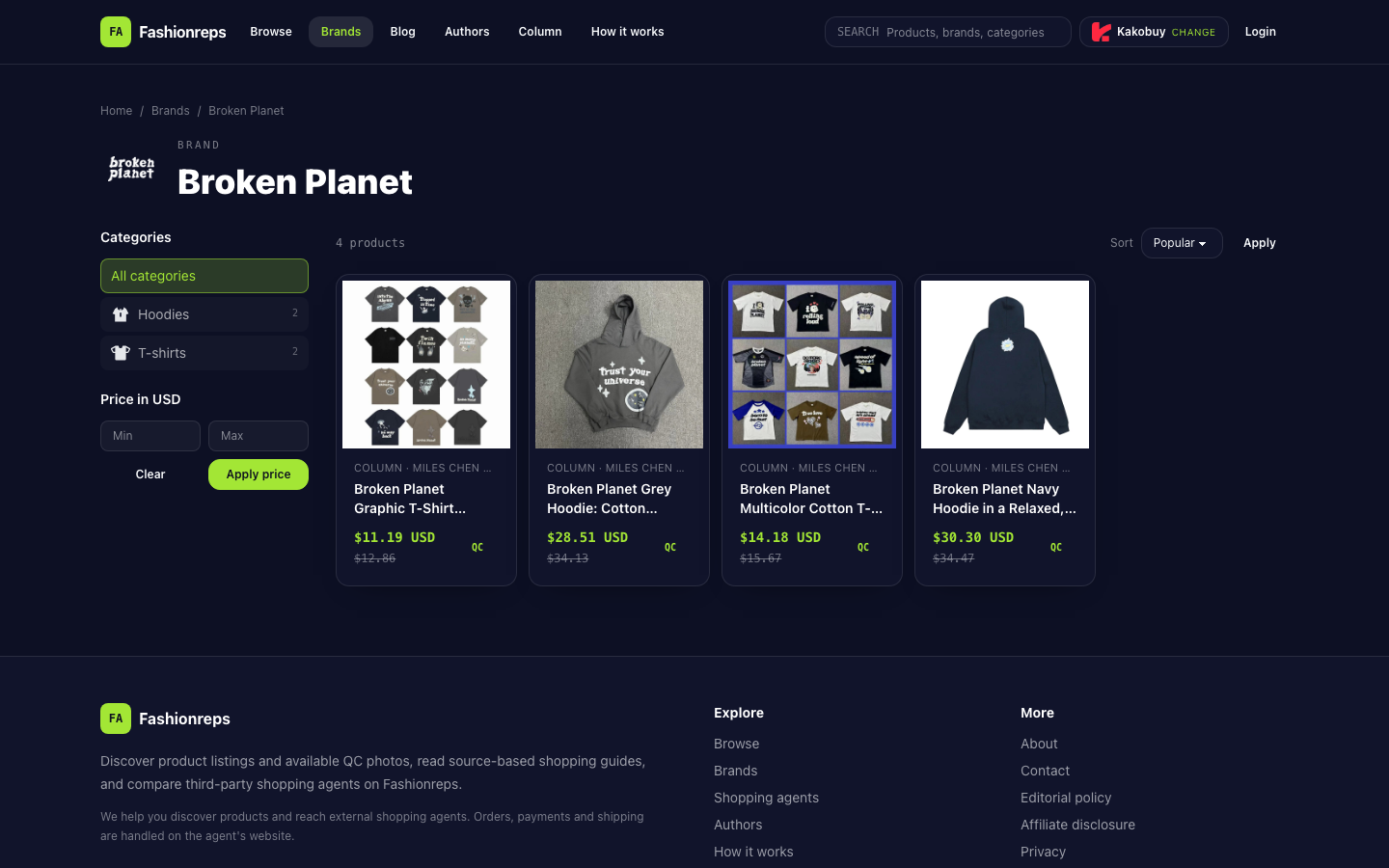
As of this verification, the Broken Planet brand page shows 4 items, with category counts of 2 Hoodies and 2 T-shirts. The page provides category filters, USD price range filters, and sorting options by popularity, newest, and price.
The page also displays product titles, reference prices, and QC entry points. The currently visible reference prices are as follows:
| Title shown in catalog | Page reference price | Visible information on page |
|---|---|---|
| Broken Planet Graphic T-Shirt Collection in a Loose Cut with Foam-Print Logos | 11.19 USD | T-shirt, QC entry available |
| Broken Planet Grey Hoodie: Cotton Pullover with Foam-Print Lettering in a Relaxed Cut | 28.51 USD | Hoodie, QC entry available |
| Broken Planet Multicolor Cotton T-Shirt with Foam-Print Graphics, S–XL | 14.18 USD | T-shirt, shows S–XL, QC entry available |
| Broken Planet Navy Hoodie in a Relaxed, Boxy Cut | 30.30 USD | Hoodie, QC entry available |
These are reference prices shown on the page and do not represent final purchase costs. The page did not provide confirmable inventory, shipping, or order totals during this verification, so these items should not be listed as confirmed purchasable products in the list.
How the website-based Spreadsheet and Google Sheets divide tasks
The website catalog is suitable for a first round of browsing. Users can narrow down by Hoodies or T-shirts from the brand page, or sort by price, then open product cards to view titles, images, and QC entry points. It preserves the relationship between items and the original page, making it suitable for revisiting the current catalog status.
Google Sheets is more suitable for a second round of organization. It can place multiple items in the same sheet, add custom status, update time, and review notes, and then filter by missing fields or abnormal status. For candidate lists that require repeated comparison, spreadsheets are also easier for keeping manual records, but the content should still be checked against the website page.
It is recommended to use the following fields:
- Product title: Copy the title actually displayed on the page, without abbreviating to the point of being unrecognizable.
- Category: Record as Hoodie or T-shirt, and cross-check with the catalog filter results.
- Page reference price: Keep the USD amount and note that it is a reference price.
- Image status: Record whether the image matches the title and color description.
- Size info: Fill in only the sizes actually displayed on the page; if no size is shown, leave blank and mark as missing.
- Product page status: Record whether the link still opens, redirects to another page, or shows anomalies.
- QC status: Record whether the page provides a QC entry point, but do not equate the existence of an entry with completed quality judgment.
- Last verification time: Save the date and time of this page view.
- Processing status: Use statuses such as pending review, keep, pause, or exclude.
A reviewable organization procedure
Step 1: Establish candidate scope from the brand page
Open the Broken Planet brand page and first confirm the total catalog count and category distribution. The current page shows 4 items, with 2 each in Hoodies and T-shirts. Do not copy product counts directly from search results or old notes, because the catalog may change.
Step 2: Filter by task, not by copying the entire catalog first
If you only want to look at tops, you can use the category filter first; if you need to control the reference price range, then use the USD price filter. Sorting can help quickly locate low-priced or newer catalog items, but sorting results cannot prove product quality, inventory, or final price.
Step 3: Fill in spreadsheet fields item by item
Enter the page title, category, reference price, and displayed sizes into Google Sheets. Images, titles, and color descriptions should be in the same row to avoid merging information from different products. For fields not explicitly given on the page, leave blank and record as pending verification, rather than inferring from the product name.
Step 4: Return to the product page to check links and QC entry points
Open the page corresponding to each item and confirm whether the link works normally and whether the page content still matches the catalog card. If the link redirects abnormally, the title does not match the image, or the QC entry is unusable, do not mark the item as directly recommendable.
Step 5: Save update time and processing status
Update the last verification time after each re-check. Only modify the corresponding fields when the title, image, link, or other actual information changes; do not just change the date to create an update record.
How to handle abnormal states
Abnormal states are more suitable for catalog management than simple "recommend" or "not recommend", because product pages may change at different times. The following judgments can be used:
- Pending review: Page exists, but image, size, or link information has not been fully checked.
- Keep: Title, image, displayed fields, and page entry point correspond to each other, but does not mean inventory or final purchase conditions are confirmed.
- Pause: Link temporarily abnormal, page information incomplete, or doubts about image-title correspondence.
- Exclude: Confirmed product page invalid, content clearly mismatched, or cannot be further verified as a valid candidate.
If the page shows product delisted, sold out, or invalid link, do not continue to recommend it as purchasable. If a certain piece of information is simply not seen, mark it as "not shown" or "pending verification", and do not write missing content as a negative conclusion.
A simple record structure
In practice, you can first create a "Candidate Catalog" sheet, then add a "Review Log" sheet. The former saves the current filterable product status, while the latter records substantive changes to the page by date.
"Candidate Catalog" is suitable for keeping product title, category, page reference price, size, image status, link status, QC status, and processing status; "Review Log" records verification date, changed fields, anomaly description, and next action. This allows quick filtering and distinguishes current status from historical changes.
Conclusion
The Broken Planet brand page is suitable for discovering products, browsing by category and price, viewing images, and entering product pages or QC entry points. Google Sheets is suitable for turning candidate products into filterable, collaborative, and trackable records.
The most important thing in organizing is not to fill all fields, but to preserve evidence boundaries: what is displayed on the page can be recorded, but inventory, shipping, final price, and purchase results not provided by the page cannot be inferred. When encountering image-title mismatches, missing sizes, or link anomalies, use pause or exclude status, and wait for the next verification before deciding whether to keep them.